Review · November 10, 2026
Bluehost AI Builder Review (2026): I Built a Real Site in 4 Minutes
By Keith, Editor · Updated November 10, 2026
Extra disclosure for this page: Bluehost pays Web Host Picks a flat fee for approved content about Bluehost AI Builder through its affiliate program, and the buttons below are affiliate links. Bluehost did not see or edit this review before it went live. Everything below comes from a free account we opened ourselves on November 10, 2026.
Short version: Bluehost AI Builder turned one sentence into a 5-page small-business website in about 3–4 minutes. It is $0 to start, no credit card, and it has paid plans from $20/mo. It is quick and the first draft looks clean. The catch is that the first draft is mostly sample content, the free plan runs on 5 credits a day, and your own domain needs a paid plan. This is not our Bluehost hosting review. That page covers the shared and WordPress plans. This page covers Bluehost AI Builder only.
Review summary
Bluehost AI Builder
Unscored on this site. Hands-on notes from one real build, not a star average.
Best for
Small businesses and side projects that want a simple, decent-looking site live today, and are happy to edit by chatting instead of dragging boxes around.
Skip if
You need your own domain without paying, full drag-and-drop design control, or a site that is ready to publish with no copy, price or review edits.
Affiliate link: we may earn a commission at no extra cost to you. Rankings stay independent.
How we tested
We opened a free Bluehost AI Builder account on November 10, 2026 with Continue with Google. We typed one prompt, answered the short profiling questions, waited for the first version, sent one chat refine, and published on the free plan. We timed each step by the clock, so the times are rounded. We ran no speed or uptime tests, we did not contact support, and we did not buy a paid plan. This review is unscored. It is a hands-on report, not a lab grade.
Step 1: one prompt
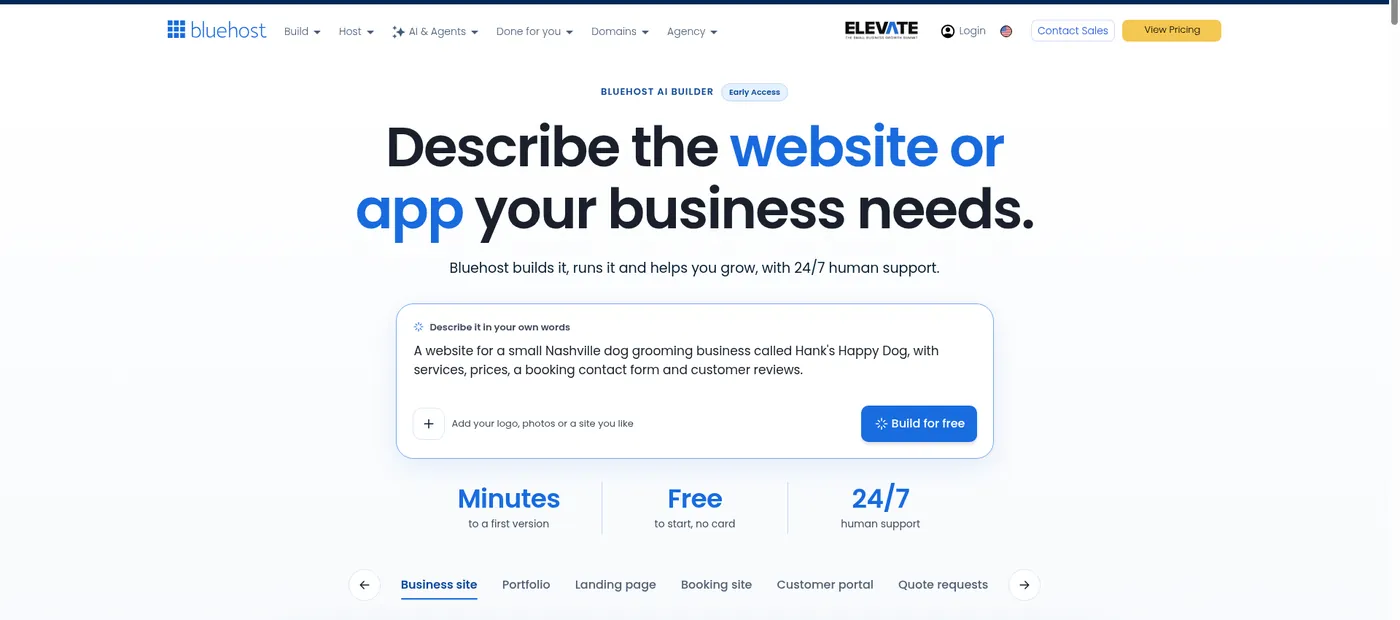
The start page has a single box headed “Describe it in your own words,” and the product carries an Early Access label. Our prompt was: “A website for a small Nashville dog grooming business called Hank’s Happy Dog, with services, prices, a booking contact form and customer reviews.” You can also add a logo, photos or a site you like. We added nothing, to see what it would do alone.
Step 2: the sign-up wall
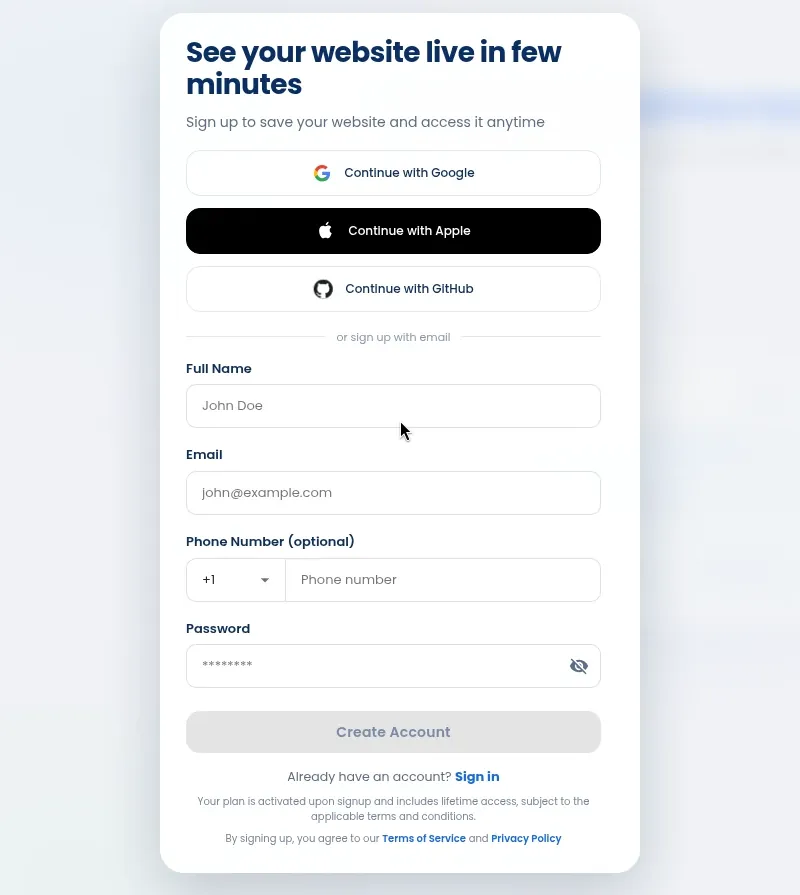
Clicking Build for free opens a sign-up form before anything is built. You can continue with Google, Apple or GitHub, or use an email and password. Phone number is optional. No card was asked for at any point on the free plan. Our email-and-password attempt did not go through on our setup, so we used Continue with Google, which worked on the first try.
Step 3: the build (about 3–4 minutes)
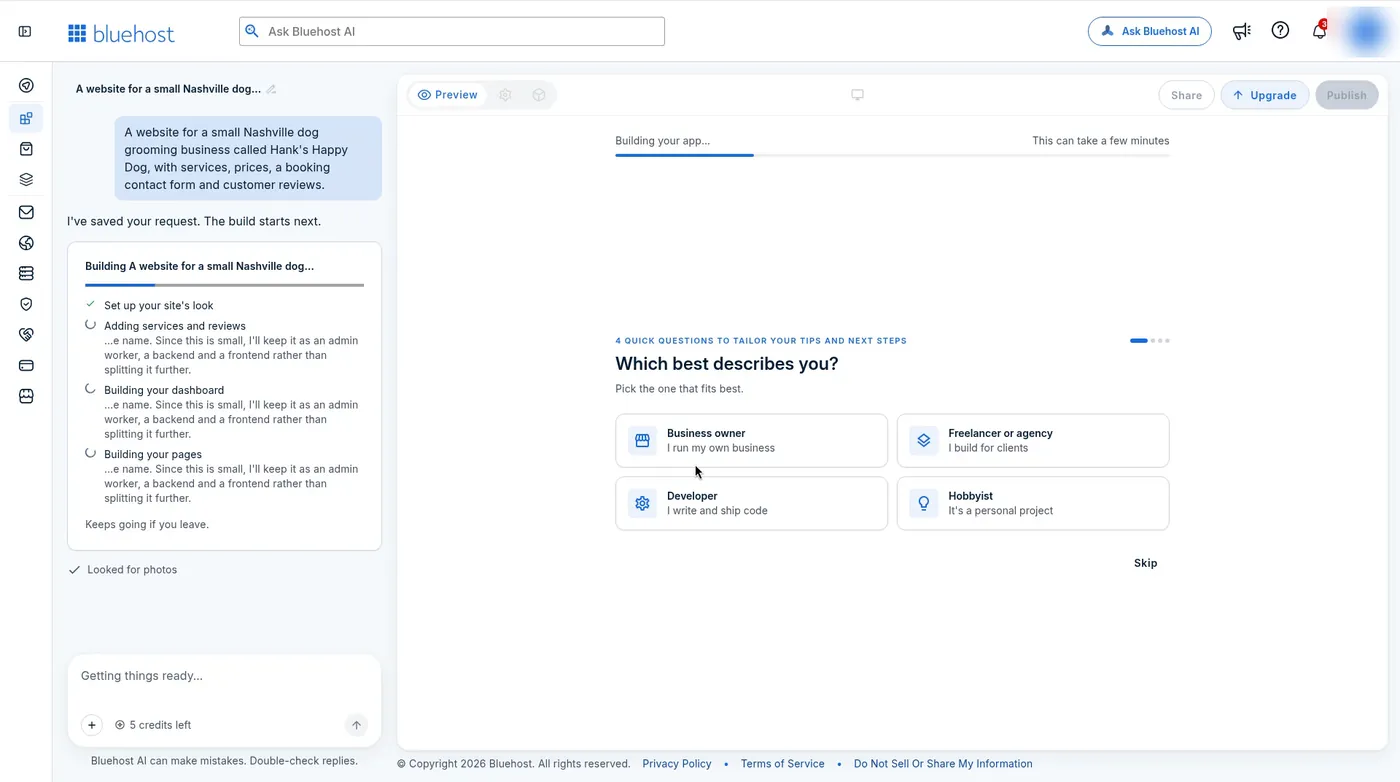
The editor opens with a chat panel on the left and a preview on the right. While the site builds, the preview asks a couple of quick profiling questions, such as whether you are a business owner, a freelancer, a developer or a hobbyist. They tailor tips, not the site. The chat panel shows a checklist: set up the look, add services and reviews, build the dashboard, build the pages. It also says it keeps going if you leave. The counter under the chat box read 5 credits left.
What the first version looked like
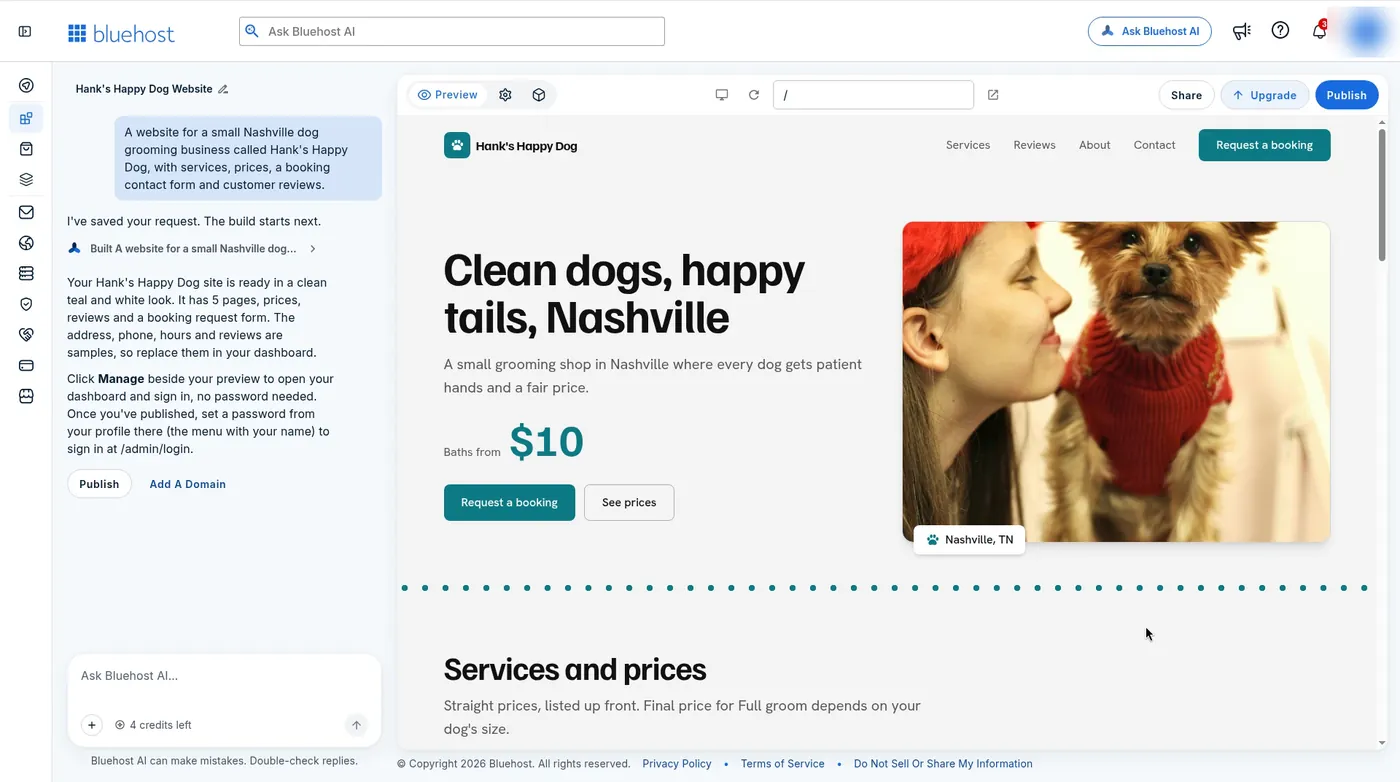
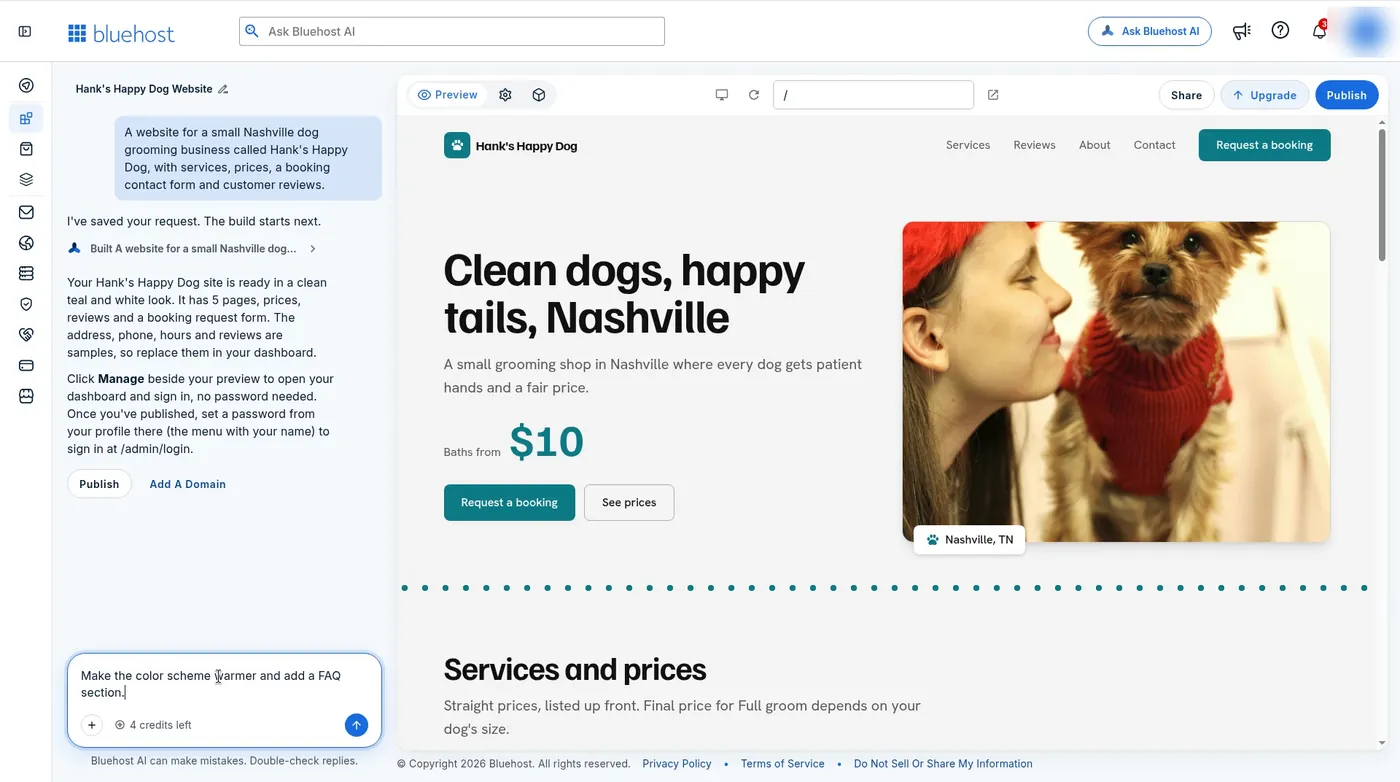
The first version was ready in about 3–4 minutes. It had 5 pages in a teal and white design, a hero line that read “Clean dogs, happy tails, Nashville,” a “Baths from $10” price, a Services and prices section, reviews, and a Request a booking form. The builder picked a photo of a small dog by itself. The menu, buttons and spacing looked like a real small-business site, not a template with lorem ipsum.
The honest caveat is the content. The chat reply said the address, phone, hours and reviews were samples to replace in the dashboard. The $10 bath price was invented too. None of that is a flaw, since the builder cannot know your prices, but you should not publish the first draft as-is. Fake reviews on a live business site are a real problem. Budget time to replace every price, review and contact detail.
Refining by chat (about 2 minutes)
Editing happens by asking. We typed “Make the color scheme warmer and add a FAQ section.” About two minutes later the site was in a warm cream, terracotta and cocoa palette, with a new FAQ page of 9 questions linked in the menu. The chat said services, prices, the booking form and reviews were left unchanged, and the preview matched that. The refine used 1 more credit, leaving 3.
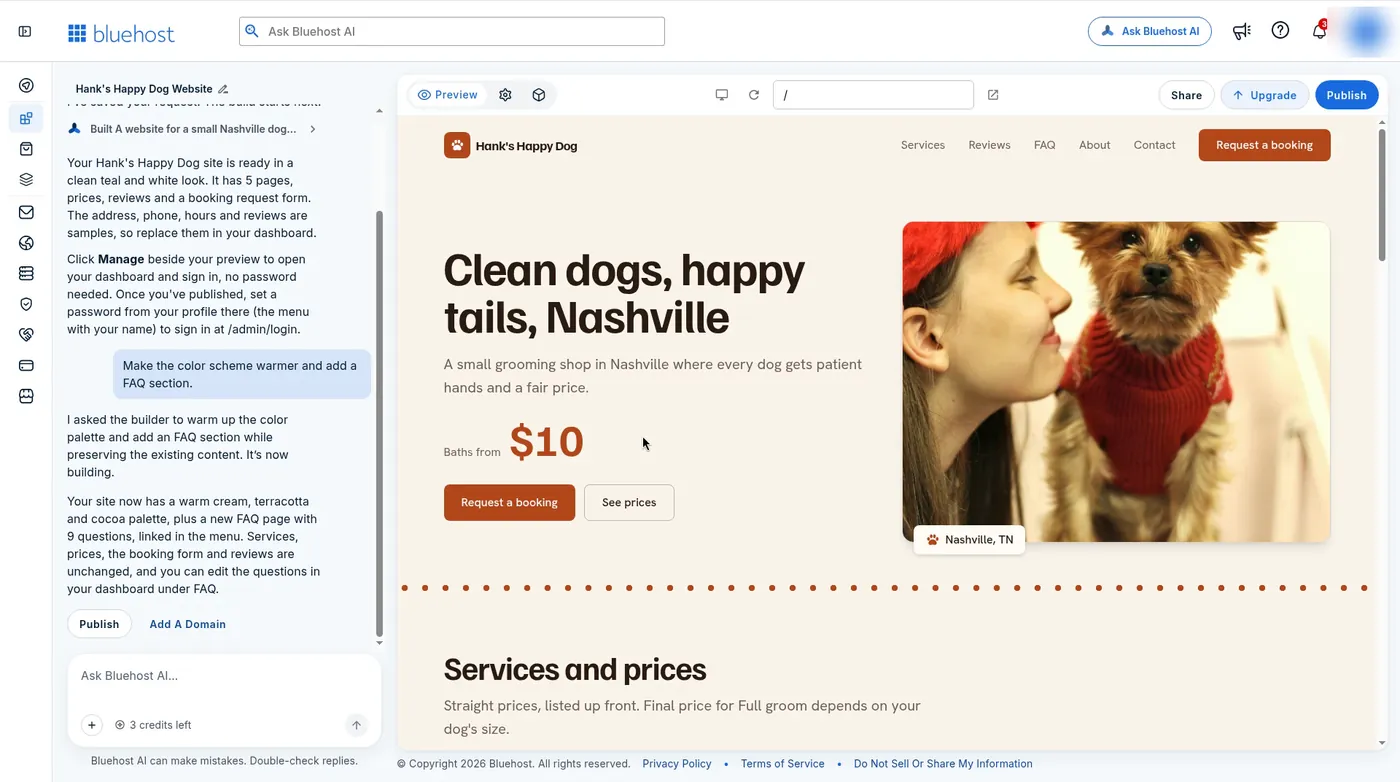
That is the core trade-off. Chat edits are fast and kept the rest of the site intact in our test. But each change costs a credit, and on the free plan you get 5 a day. Ten small tweaks is two days of free credits. We only edited by chat, so we cannot speak to fine, pixel-level control.
Publishing on the free plan (about 3 minutes)
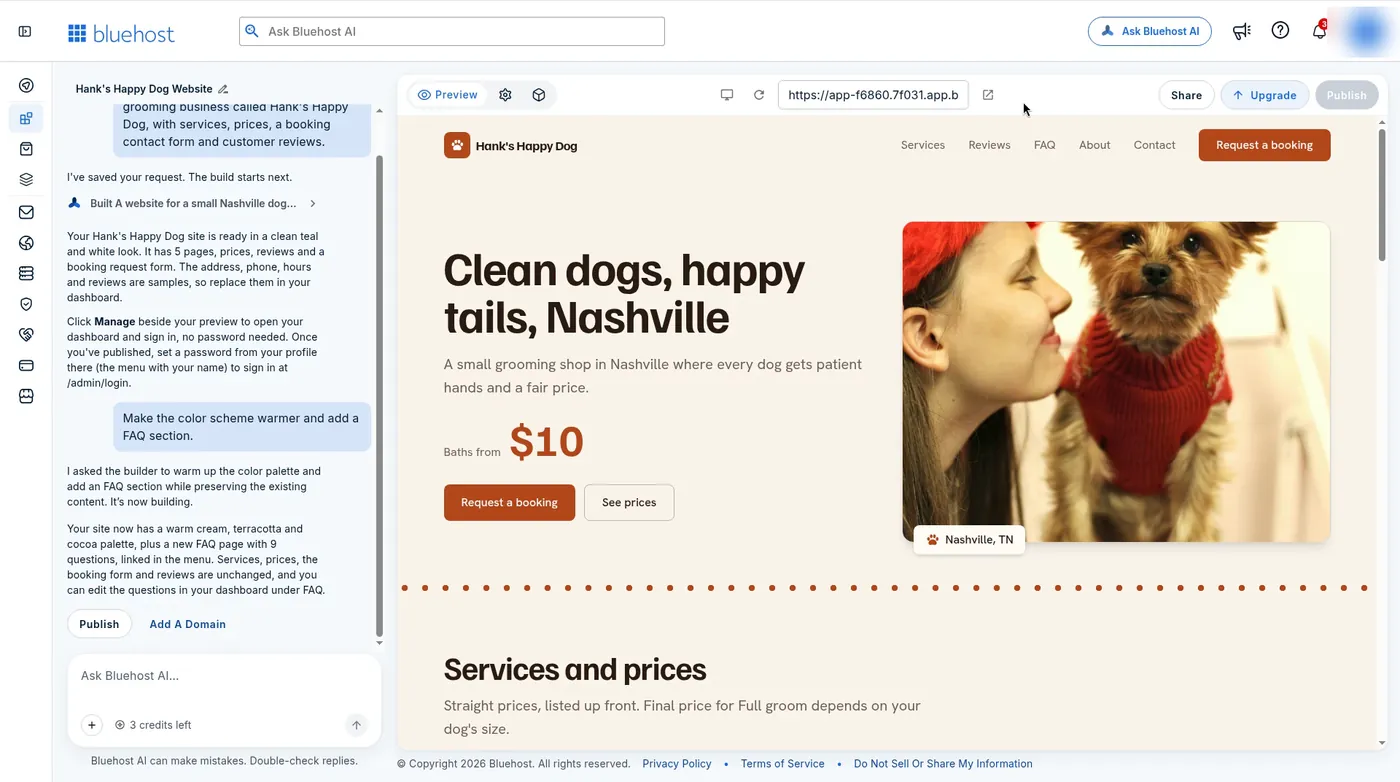
Publish took about 3 minutes and asked for no card. The site went live on a Bluehost subdomain, an address like app-xxxx.xxxx.app.bluehost.ai. That is fine for a test or a private link, but not for a business card. Connecting your own domain needs a paid plan.
Affiliate link: we may earn a commission at no extra cost to you. Rankings stay independent.
Try Bluehost AI Builder freeBluehost AI Builder pricing (Last verified November 10, 2026)
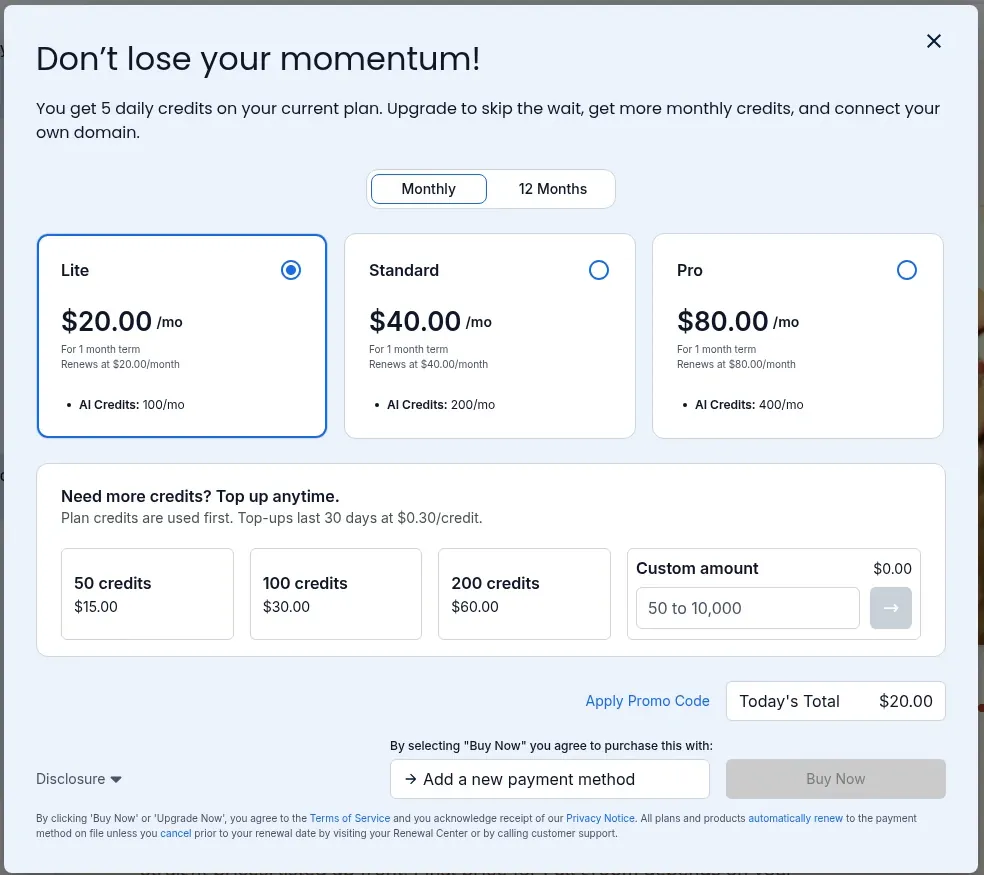
Bluehost AI Builder is $0 to start, no credit card, and it has paid plans from $20/mo. These are the plans the in-app upgrade window showed us on November 10, 2026. The Monthly tab listed each plan on a 1-month term, renewing at the same monthly price. The 12 Months tab showed the yearly rates below.
| Plan | Monthly | AI credits / mo | 12 months (per mo) | 12-month renewal |
|---|---|---|---|---|
| Lite | $20.00/mo | 100 | $16.00/mo | $192.00/yr |
| Standard | $40.00/mo | 200 | $32.00/mo | $384.00/yr |
| Pro | $80.00/mo | 400 | $64.00/mo | $768.00/yr |
Top-ups cost $0.30 a credit: 50 for $15.00, 100 for $30.00, or 200 for $60.00. Top-up credits last 30 days, and plan credits are used first. The upgrade window also says a paid plan skips the daily wait and lets you connect your own domain.
Free-plan limits
- 5 AI credits a day. Each build or refine used 1 in our test.
- Publishing goes to a Bluehost subdomain, not your own domain.
- The first draft uses sample prices, reviews, hours and address.
- The product is Early Access, so screens and limits may change.
- Bluehost’s marketing page says 24/7 human support is included on Free. We did not test support.
Pros
- A real, clean 5-page site from one sentence in about 3–4 minutes.
- $0 to start, no credit card. We published without entering payment details.
- Chat edits changed what we asked and left the rest alone.
- It built a booking request form and an editable FAQ, not just pages.
- Paid plans are month to month, with no long prepay required.
Cons
- Sample content you must replace, including reviews and prices.
- 5 credits a day goes fast if you like to tweak.
- No own domain on the free plan.
- Early Access: expect rough edges. Our email sign-up did not go through.
- We edited by chat only and cannot vouch for fine design control.
Who it is for
Bluehost AI Builder fits a local service business, a freelancer, or a side project that needs a tidy site with services, prices and a contact form this week, and does not want to learn an editor. It also suits anyone who wants to try an idea for $0 before paying.
Skip it if you want WordPress, plugins and full control. For that, start with regular hosting: our best web hosting for bloggers guide covers blogs, and best affordable web hosting covers low-cost plans. If you are weighing it against Wix, read Bluehost AI Builder vs Wix AI.
Verdict
Bluehost AI Builder did what the name says. One prompt gave us a believable small-business site in about 3–4 minutes, one chat request restyled it in about 2 minutes, and it went live for $0. Treat the first draft as a strong starting layout, not a finished site, and expect to pay $20.00/mo once you want your own domain or more than 5 credits a day.
Affiliate link: we may earn a commission at no extra cost to you. Rankings stay independent.
Build a site free with Bluehost AI BuilderRelated guides
- Bluehost AI Builder vs Wix AI compares the two prompt-to-site builders.
- Bluehost review covers Bluehost’s regular shared and WordPress hosting.
- Best web hosting for bloggers is the WordPress route for a blog.
- Best affordable web hosting covers low-cost hosting plans.
Bluehost AI Builder FAQs
Is Bluehost AI Builder good?
For a small business that needs a simple site fast, yes. Our one-prompt test gave a 5-page site with services, prices, reviews and a booking request form in about 3–4 minutes. A chat refine took about 2 minutes. Publishing to a free subdomain took about 3 minutes and needed no card. The copy, prices, address, hours and reviews were samples, so plan time to replace them. The product is labelled Early Access.
How much does Bluehost AI Builder cost?
Bluehost AI Builder is $0 to start, no credit card, and paid plans from $20/mo. On November 10, 2026 the upgrade window showed Lite at $20.00/mo with 100 AI credits a month, Standard at $40.00/mo with 200, and Pro at $80.00/mo with 400, each on a 1-month term. The 12 Months option showed $16.00, $32.00 and $64.00 a month, renewing at $192.00, $384.00 and $768.00 a year.
What do you get on the Bluehost AI Builder free plan?
The free plan gives 5 AI credits a day. In our test the first build used 1 credit and the chat refine used 1 more. You can publish, but only to a Bluehost subdomain. Connecting your own domain needs a paid plan.
How do Bluehost AI Builder credits work?
In our test, each build or chat refine used 1 credit. The counter under the chat box went from 5 to 4 after the first build, then to 3 after one refine. Top-ups cost $0.30 a credit (50 for $15.00, 100 for $30.00, 200 for $60.00) and last 30 days. Plan credits are used first.
Can I use my own domain with Bluehost AI Builder?
Not on the free plan. Our free site published to an app.bluehost.ai subdomain. The upgrade window says a paid plan lets you connect your own domain. We did not buy a plan or test a domain connection.
Is Bluehost AI Builder the same as Bluehost hosting?
No. Bluehost AI Builder is a prompt-to-site product with its own plans and credits. Regular Bluehost shared and WordPress hosting is a different product with different prices. Our Bluehost review covers that hosting.
Prefer to try it yourself? Open Bluehost AI Builder ($0 to start, no credit card).