Comparison · November 10, 2026
Bluehost AI Builder vs Wix AI Website Builder (2026)
By Keith, Editor · Updated November 10, 2026
Extra disclosure for this page: Bluehost pays Web Host Picks a flat fee for approved content about Bluehost AI Builder through its affiliate program, and the Bluehost buttons are affiliate links. We have no Wix affiliate deal. Bluehost did not see or edit this comparison.
How this comparison works: we built a real site on Bluehost AI Builder on November 10, 2026, so every Bluehost screenshot and timing below is ours. We did not build a Wix site. Every Wix number comes from wix.com pages we read on November 10, 2026, listed under Sources. Where Wix does not publish a figure, we left the cell out instead of guessing. Neither product gets a star score.
Short version: Bluehost AI Builder is the quicker, simpler, chat-only route, $0 to start, no credit card and with paid plans from $20/mo month to month. Wix is the bigger platform, with AI generation plus a drag-and-drop editor and more built-in business tools, from $17/mo on a yearly plan. Our full hands-on is the Bluehost AI Builder review.
At a glance
| Bluehost AI Builder | Wix AI website builder | |
|---|---|---|
| Start free | Yes. $0 to start, no credit card | Yes. Free plan, no credit card required |
| Free-plan address | Bluehost subdomain (app.bluehost.ai) | wixsite.com address with Wix branding |
| Free-plan AI | 5 credits a day | Up to 30 credits a day, capped at 120 a month |
| Cheapest paid plan | Lite, $20.00/mo monthly ($16.00/mo on 12 months) | Light, $17/mo yearly ($24/mo monthly) |
| Other paid plans | Standard $40.00, Pro $80.00 a month | Core $29, Business $39, Business Elite $159 a month, yearly |
| AI credits on paid plans | 100 / 200 / 400 a month | Estimated up to 150 / 200 / 300 / 1000 actions a month |
| Extra credits | Top-ups at $0.30 a credit, last 30 days | Can add credits to your account; price not shown on the pages we read |
| Own domain | Paid plan | Premium plan, plus a 1-year domain voucher on yearly plans |
| How you edit | Chat prompts (what we used) | AI, the Aria agent, and drag and drop |
| Refund window | Not checked | 14-day money-back on first upgrade |
| Status | Early Access | Current builder; Wix ADI retired Nov 10, 2024 |
Affiliate link: we may earn a commission at no extra cost to you. Rankings stay independent.
Try Bluehost AI Builder freeBuilding the site: what we saw on Bluehost
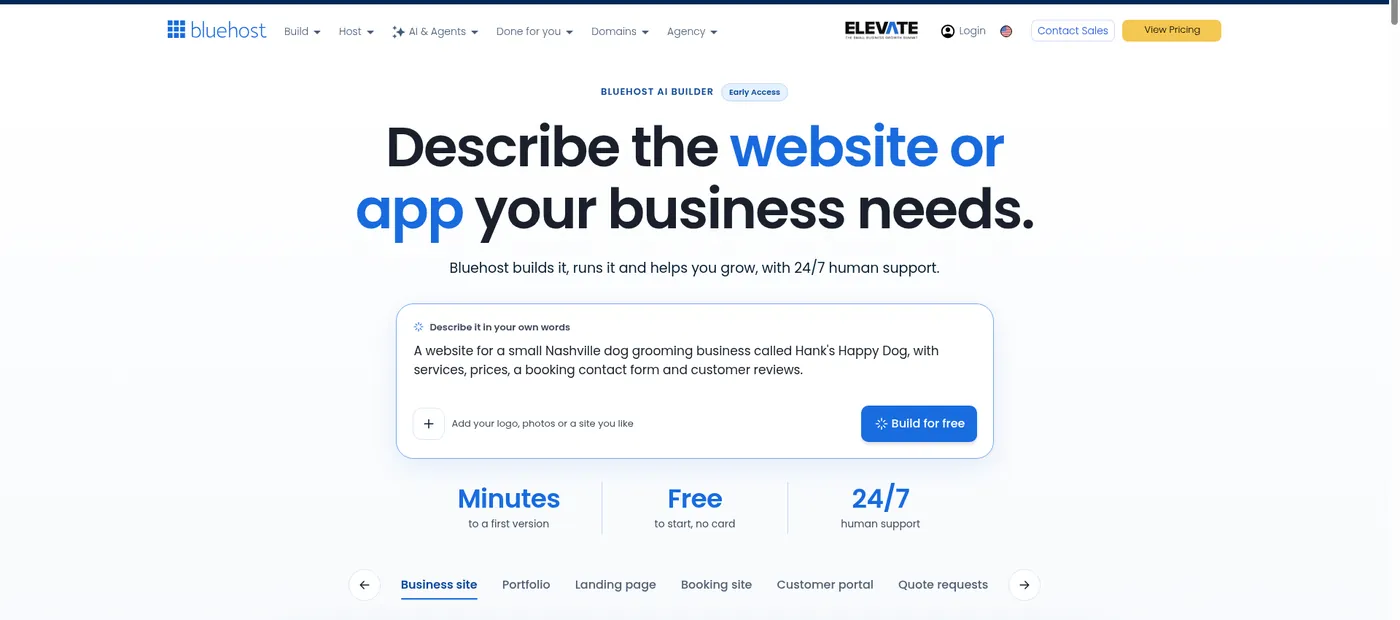
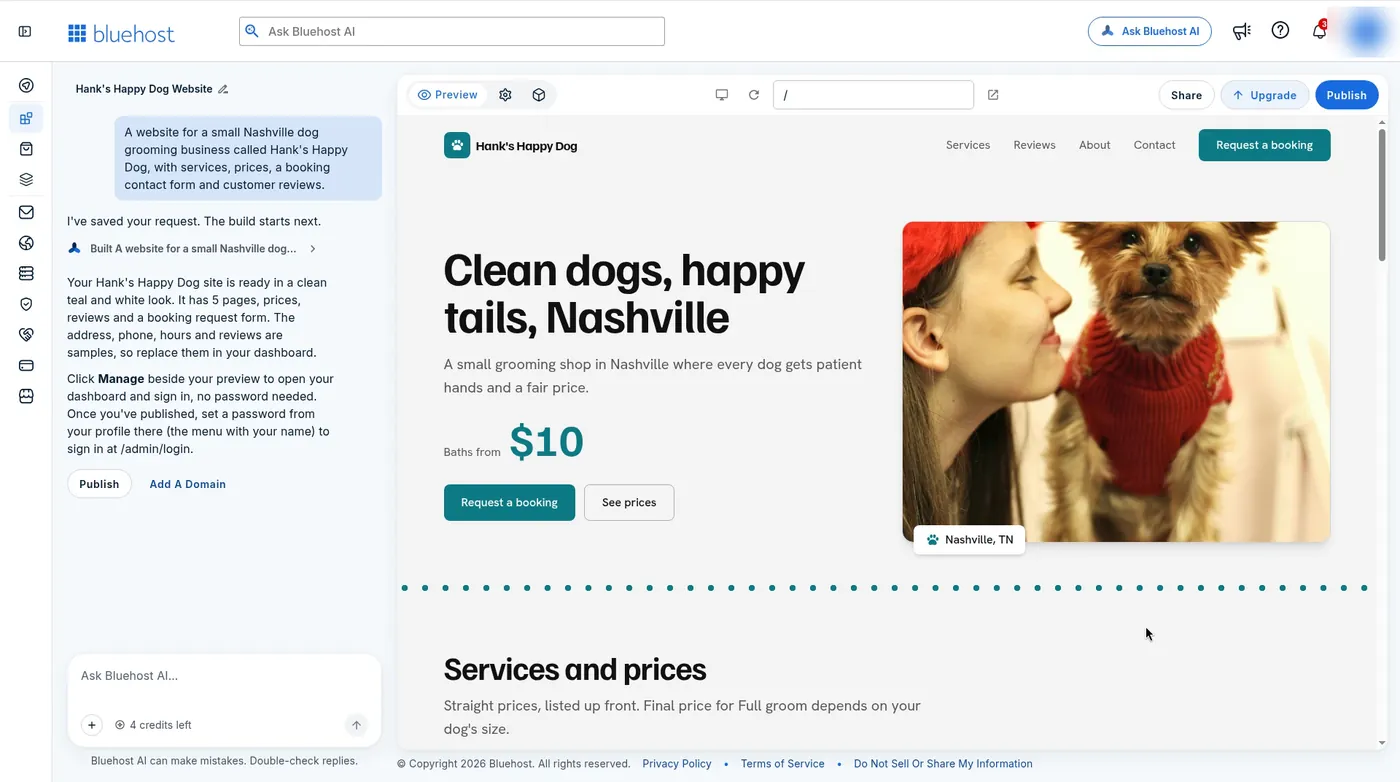
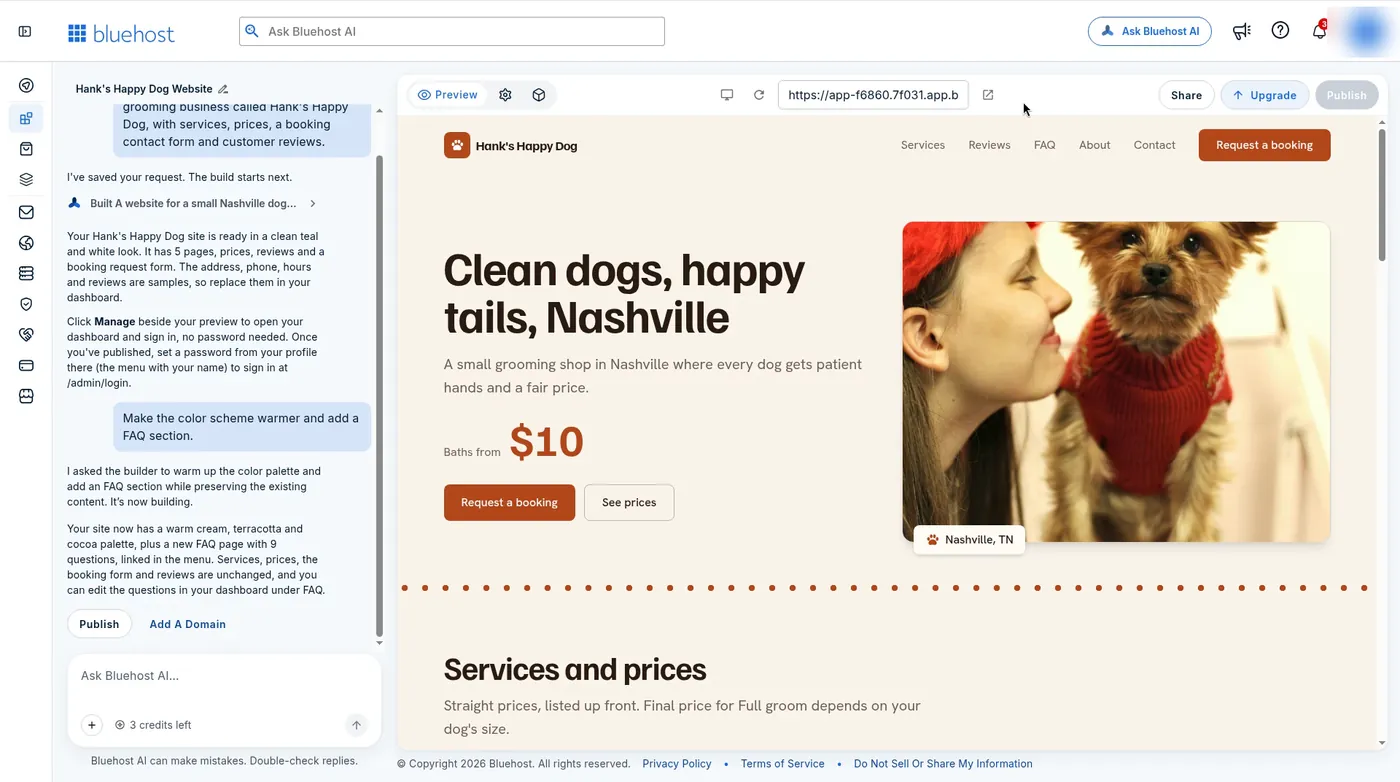
We gave Bluehost AI Builder one sentence: a website for a small Nashville dog grooming business called Hank’s Happy Dog, with services, prices, a booking contact form and customer reviews. After a Google sign-up and a couple of profiling questions, the first version was ready in about 3–4 minutes. It had 5 pages, a teal and white design, a booking request form, and sample prices, hours, address and reviews that we would have to replace.
Wix describes a similar start. Its AI builder page says you describe what you want and it generates pages, sections and visuals, and that creating a site with AI “typically takes just a few minutes.” We did not time Wix, so we will not claim one is faster.
Editing: chat-only vs chat plus drag and drop
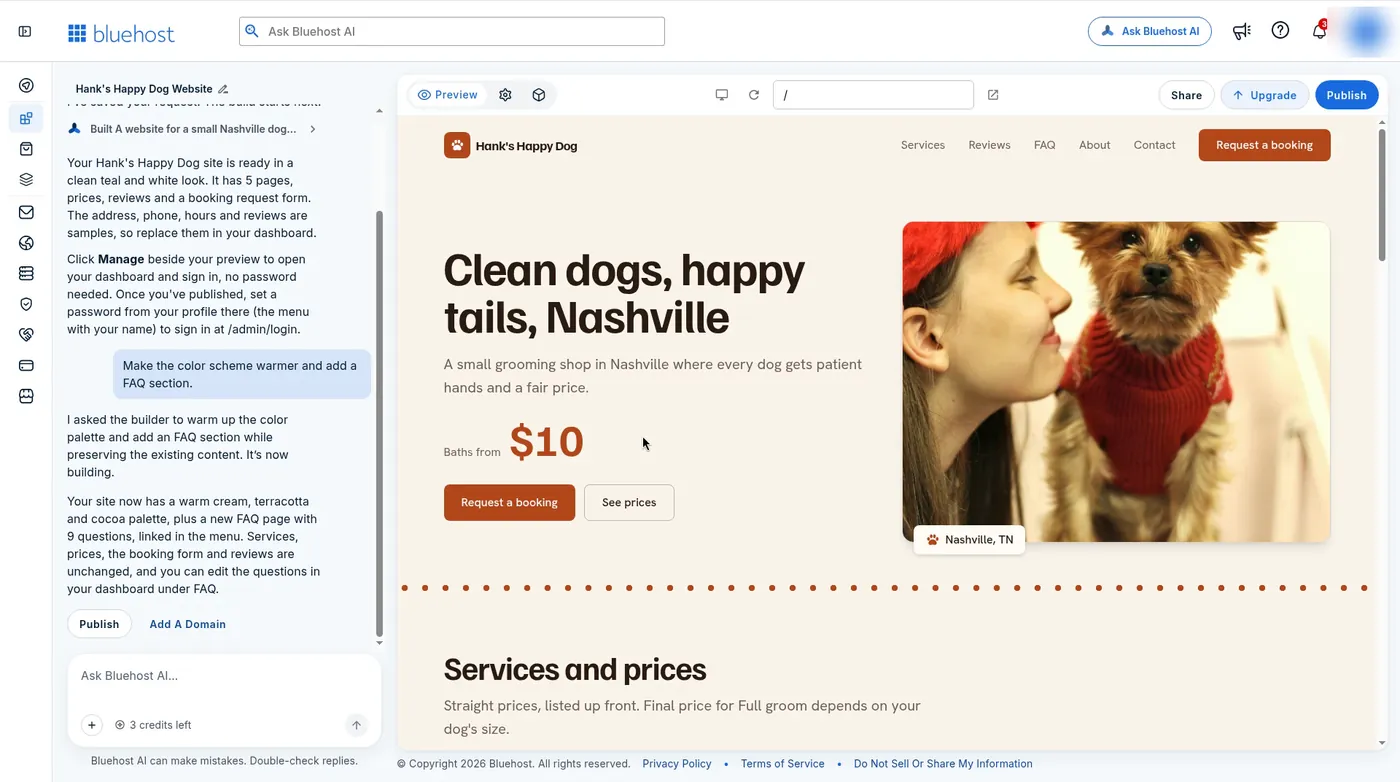
On Bluehost AI Builder, we edited by asking. “Make the color scheme warmer and add a FAQ section” took about 2 minutes and returned a cream, terracotta and cocoa palette plus a 9-question FAQ page, leaving the services, prices, form and reviews alone. Each build or refine used one credit, and the free plan has 5 a day.
Wix is built for both styles. Its pages describe Wix Harmony, where you generate a site from a prompt, refine it by talking to Aria, its AI agent, and switch to drag and drop for pixel-level changes. Wix’s help center says chatting with Aria does not use AI credits. If you like nudging every margin by hand, that is a real advantage for Wix. If you would rather never touch a layout tool, Bluehost’s chat-only flow is less to learn.
Pricing compared
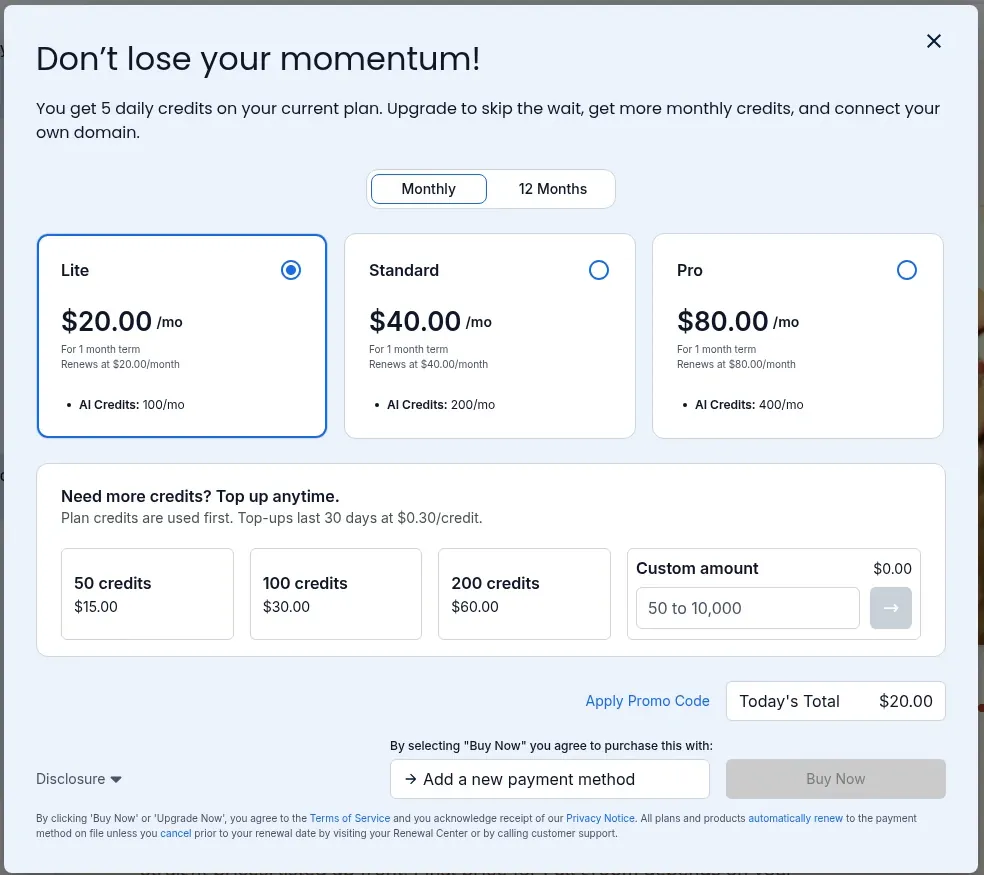
Bluehost AI Builder is $0 to start, no credit card, with paid plans from $20/mo. The in-app upgrade window on November 10, 2026 showed Lite at $20.00/mo with 100 AI credits, Standard at $40.00/mo with 200, and Pro at $80.00/mo with 400, each on a 1-month term. The 12 Months tab showed $16.00, $32.00 and $64.00 a month, renewing at $192.00, $384.00 and $768.00 a year.
Wix lists Light at $17, Core at $29, Business at $39 and Business Elite at $159 a month on yearly plans paid in full at purchase. Wix’s own blog puts month-to-month billing at $24, $36, $46 and $172. Wix takes online payments from Core up. Its yearly plans include a free domain voucher for one year, valid on a new domain bought from Wix.
| Billing | Bluehost AI Builder Lite | Wix Light |
|---|---|---|
| Month to month | $20.00/mo | $24/mo |
| Yearly | $16.00/mo ($192.00/yr renewal) | $17/mo, paid yearly |
| AI allowance | 100 credits a month | Estimated up to 150 actions a month |
The credit numbers are not apples to apples. On Bluehost, a build or a refine used a credit in our test. On Wix, credits go to tools such as Smart Chat, the AI Custom Agent, the AI Marketing Agent and the AI Phone Agent, and Wix calls its per-plan counts estimates.
Free plans compared
- Bluehost AI Builder: $0 to start, no credit card, 5 AI credits a day, publishing to an app.bluehost.ai subdomain. Its marketing page says 24/7 human support is included on Free. We did not test it.
- Wix: free plan with no credit card, a wixsite.com address, Wix branding, 500 MB storage, 1 GB bandwidth, no online payments, and up to 30 AI credits a day, capped at 120 a month.
Starting points: prompt only vs prompt or template
Bluehost AI Builder starts from a prompt box. You can attach a logo, photos or a site you like, and the start page shows example types such as a business site, portfolio, landing page, booking site, customer portal and quote requests. We used the prompt alone. That keeps the first step simple, but the look depends on how well you describe it and on the refines you spend credits on afterward.
Wix gives you both doors. Its plans page lists 2,000+ templates next to the AI builder, and its five-step guide starts with “create your site from a prompt or choose a free template.” If you already know the layout you want, a template can be faster than describing it.
What we did not test
We did not build, time or publish a Wix site, so there are no Wix screenshots here. We did not test either company’s support, page speed, uptime, store or booking tools, and we did not buy a paid plan on either side. We also did not check Bluehost AI Builder’s refund terms. Where the table says “Not checked,” that is why.
Which should you pick?
Pick Bluehost AI Builder if you want a simple local business or side-project site live today, you would rather describe changes than drag boxes, and you want monthly billing at the lower entry price. Treat the first draft as a layout and replace the sample content before you share it.
Pick Wix if you want hands-on design control, 2,000+ templates, built-in payments, scheduling and stores, and a builder that is past the Early Access stage. Expect to pay yearly to get its lowest prices.
If you want WordPress instead of a builder, skip both. Our best web hosting for bloggers and best affordable web hosting guides cover that route, and the Bluehost review covers Bluehost’s regular hosting.
Affiliate link: we may earn a commission at no extra cost to you. Rankings stay independent.
Build free with Bluehost AI BuilderRelated guides
- Bluehost AI Builder review is our full hands-on test with every screenshot.
- Bluehost review covers Bluehost’s shared and WordPress hosting.
- Best affordable web hosting covers low-cost hosting plans.
Bluehost AI Builder vs Wix FAQs
Is Bluehost AI Builder cheaper than Wix?
It depends on billing. Bluehost AI Builder has paid plans from $20/mo on a monthly term (Lite, 100 AI credits). Wix Light is $17/mo on a yearly plan paid up front, or $24/mo month to month, per Wix on November 10, 2026. Month to month, Bluehost AI Builder Lite is cheaper. Both are free to start.
Do Bluehost AI Builder and Wix AI have free plans?
Both. Bluehost AI Builder is $0 to start, no credit card, with 5 AI credits a day and publishing to a Bluehost subdomain. Wix has a free plan with no credit card, a wixsite.com address, Wix branding, 500 MB storage, 1 GB bandwidth, and up to 30 AI credits a day, capped at 120 a month.
Which is easier to edit, Bluehost AI Builder or Wix?
Bluehost AI Builder edits by chat. We changed the colors and added a FAQ page with one request in about 2 minutes. Wix pairs AI generation and its Aria agent with a drag-and-drop editor, so you can also move elements by hand. We did not build a Wix site, so this is from Wix's own pages.
Can I use my own domain for free?
Neither free plan lets you connect your own domain. Bluehost AI Builder needs a paid plan to connect one. Wix needs a Premium plan, and its yearly plans include a one-year domain voucher for a new domain bought from Wix, redeemable within 60 days.
How do AI credits compare?
They count different things. In our Bluehost AI Builder test, each build or chat refine used 1 credit, and paid plans include 100, 200 or 400 a month, with top-ups at $0.30 a credit. Wix's help center says chatting with Aria does not use credits. Wix credits go to tools such as Smart Chat and its AI agents, with estimates of up to 150 actions a month on Light and 1000 on Business Elite.
Which should I pick?
Pick Bluehost AI Builder for the fastest route from one sentence to a simple small-business site, edited by chat, on month-to-month billing. Pick Wix if you want drag-and-drop control, thousands of templates, and built-in payments, bookings and stores on a builder that is out of Early Access.
Sources
- Bluehost AI Builder: our own free account, built and published November 10, 2026. Prices from the in-app upgrade window that day. Bluehost AI Builder
- Wix plans and yearly prices: wix.com/plans, checked November 10, 2026.
- Wix month-to-month prices and free-plan limits: Wix blog, “Is Wix really free?” (editor’s note dated November 2026), checked November 10, 2026.
- Wix AI builder features, Aria and ADI retirement: wix.com/ai-website-builder, checked November 10, 2026.
- Wix AI credits: Wix Help Center, About AI Credits, checked November 10, 2026.